Webhooks
Overview of Stashbase webhooks
With webhooks you can send HTTP request to your server whenever secrets in selected environment are modified. You can easily create and manage environment webhooks in the web dashboard or using SDKs or CLI. The webhooks are triggered whenever any secret in the environment is modified, whether it's a name, value, or comment.
Payload format
The webhook payload is a JSON object with the following structure:
{
  "id": string,
  "live_mode": boolean,
  "created_at": unix timestamp,
  "type": "secrets.updated",
  "data": {
    "workspace": {
      "id": string,
      "name": string
      "slug": string
    },
    "project": {
      "id": string,
      "name": string
    },
    "environment": {
      "id": string,
      "name": string
    }
  }
}
Handle event
Set up HTTPS endpoint to receive webhook events. For example your endpoint can be /webhook. Webhook event will be sent as POST request with the JSON payload.
Your server must be configured to accept POST requests and must return any success status code 2xx (e.g. 200, 201, 204) within 10 seconds.
It is recommend to return the succss response as soon as possible and process the event asynchronously afterwards.
All failed webhook events will be retried for total of 5 attempts with exponential backoff and delay between attempts. If all 5 attempts of the event fail, the webhook will be disabled. There will be delivered only the latest webhook event so that no duplicate events are sent to your endpoint.
Stashbase also sends a webhook id in the heades of each delivery as stashbase-webhook-id so youy can easily identify the webhook that delivered the event.
Test webhook
Every webhook can be tested using the web dashboard or with Stashbase CLI. When you send a test request to your endpoint, the payload property live_mode will be set to false so you can easily filter test events:
{
  "id": string,
  "live_mode": false,
  ...
}
Each test event result will have the following structure, which ensures that it is easy to detect and resolve any issues:
- status:
successorfailure - HTTP status code:
numberorN/A - Response message:
string
Local development
If you are working locally you can use tools like Ngrok to test your local webhook endpoint.
Logs
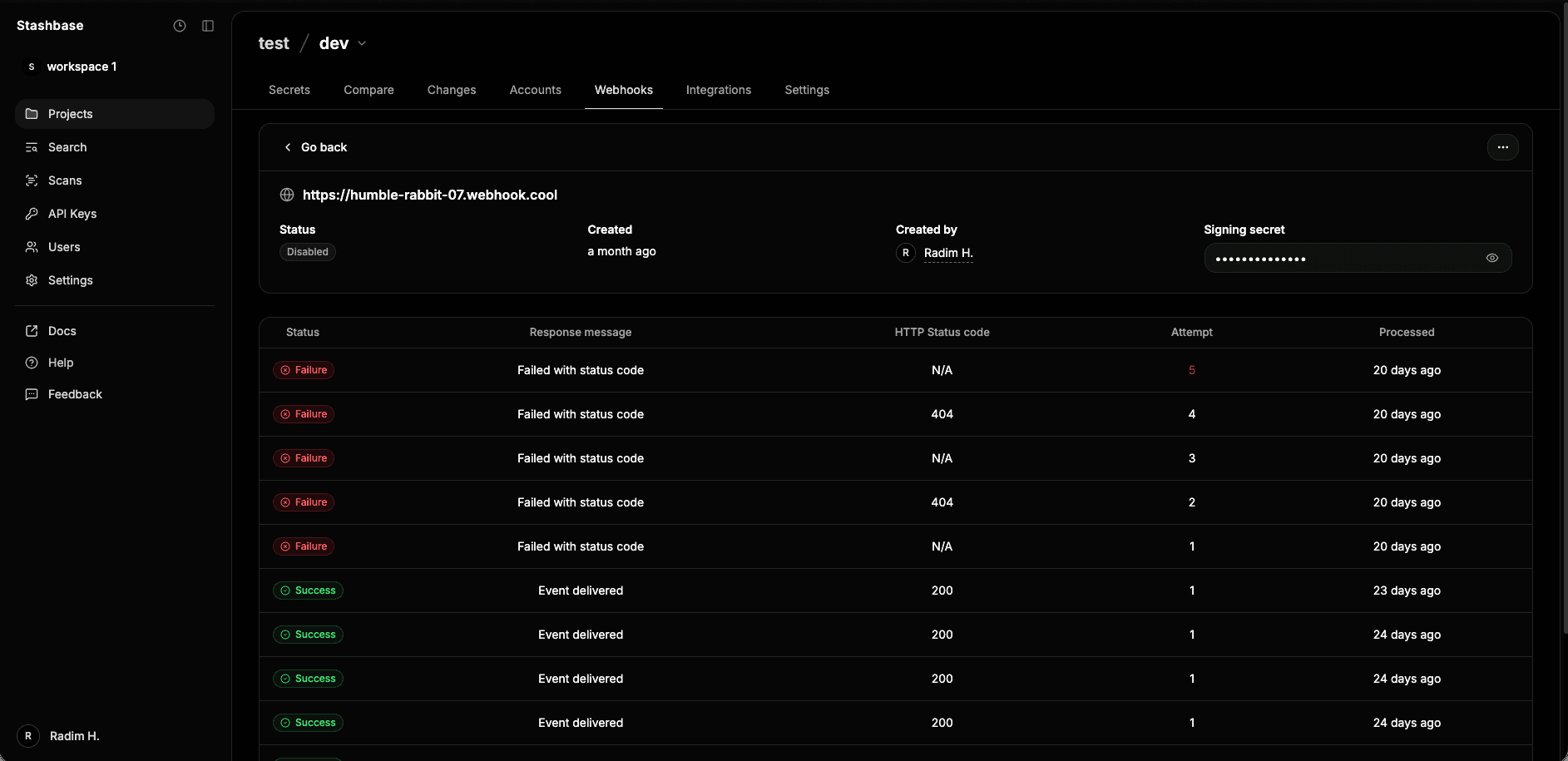
Each webhook attempt is stored in the database and can be viewed in the web dashboard or with Stashbase CLI. When using the web dashboard you can view your webhook logs in real time. Each webhook log has the following structure:
- Status:
successorfailure - HTTP status code:
numberorN/A - Response message:
string - Attempt:
number - Processed:
relative datetime
Secure your endpoint
Each webhook has own singing secret that is used to sign the webhook event request and its payload.
To verify integrity of the message and prevent timing attacks, the webhook event is signed with the signing key and timestamp.
The result signature is send in headers as stashbase-signature and has the following format {timestamp}.{signature}.
To prevent replay attacks, Stashbase generates the timestamp and the signature every time we send a webhook event to your endpoint (even for retries).
Although you can verify the signature manually, we recommend using our secure official libraries to verify signatures. You perform the verification by providing the event payload, the stashbase-signature header, and the endpoint’s secret. If verification fails, you get an error.
import { verifyWebhook } from "@stashbase/node-sdk"

// Example using Fastify
const app = Fastify()

// Route to receive the webhook
app.route({
method: 'POST',
url: '/webhook',
handler: async (req, rep) => {
// Example value: whsec_rqOCECk4zyntqFcABAfEWJ4jH9lJO1df
const signingSecret = process.env.STASHBASE_WEBHOOK_SECRET

  // Received signature from headers
  const signature = req.headers['stashbase-signature']

  // Verify webhook
  const { event, error } = await verifyWebhook(req?.body, signature, signingSecret)

  if (error) {
    return rep.status(400).send({ error })
  }

  // Send success response
  rep.status(200).send()

  // Process event...
  },

})

app.listen({ port: 3000 })
import (
 stashbaseWebhooks "github.com/stashbase/stashbase-go/webhooks"
)

// Example using Gin
func main() {
	r := gin.Default()

	r.POST("/webhook", func(c *gin.Context) {
        // Example value: whsec_rqOCECk4zyntqFcABAfEWJ4jH9lJO1df
		signingSecret := os.Getenv("STASHBASE_WEBHOOK_SECRET")

        // Received signature from headers
		signature := c.GetHeader("stashbase-signature")

        // Convert request body to rawMessage
		var requestBody json.RawMessage

		if err := c.ShouldBindJSON(&requestBody); err != nil {
			c.JSON(http.StatusBadRequest, gin.H{"error": err.Error()})
			return
		}

        // Verify webhook
		event, err := VerifyWebhook(requestBody, signature, signingSecret)

		if err != nil {
			c.JSON(http.StatusBadRequest, gin.H{"error": err.Error()})
		} else {
          c.Status(http.StatusNoContent)
          // Process the event...
		}

	})

	r.Run(":3000")
}