Environments
Overview of Stashbase environments
Each project can have multiple environments. Those environments are used to store secrets.
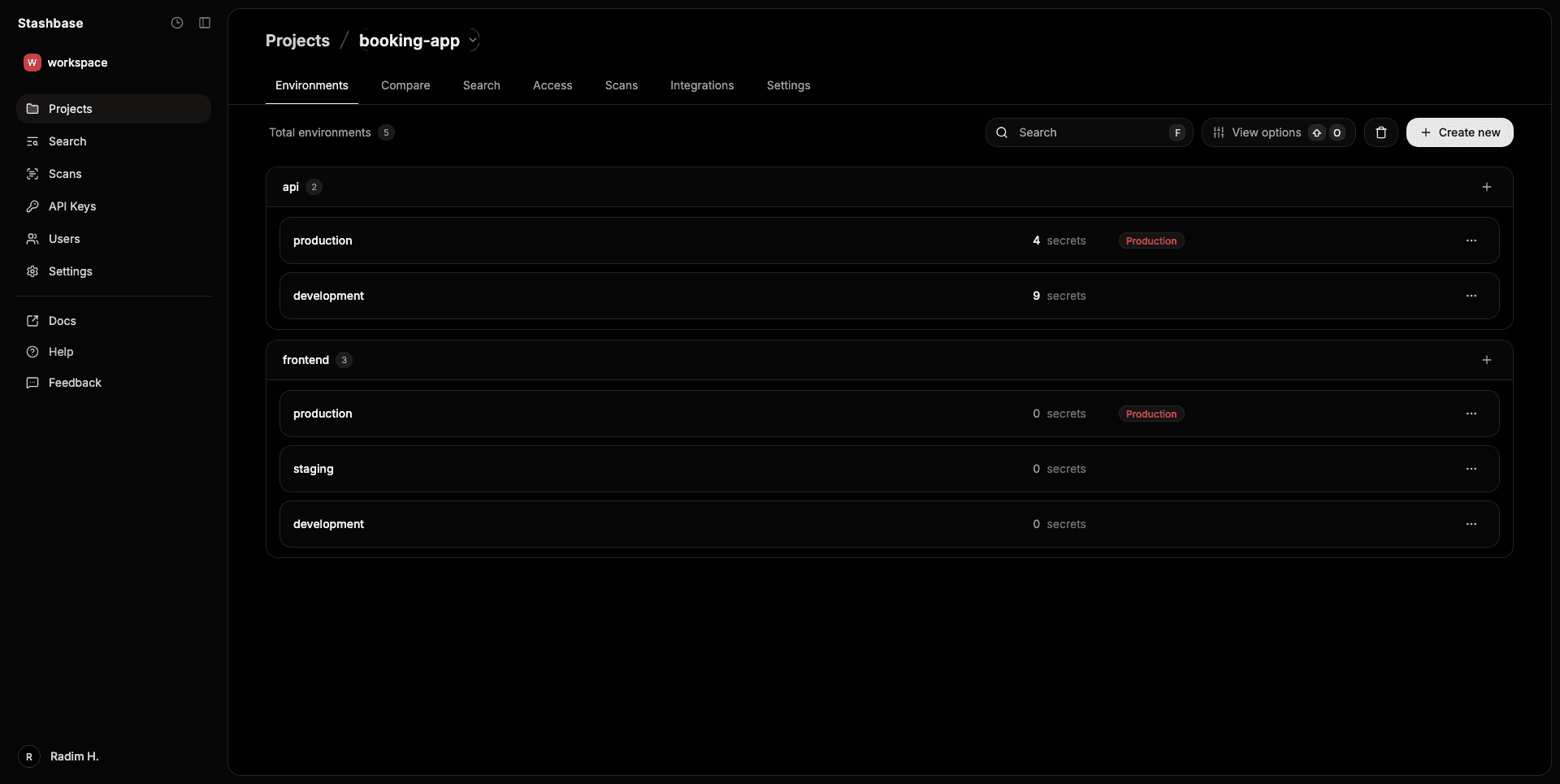
Structure of an environment
Stashbase does not enforce rigid development/staging/production environment structure. You can create as many environments as you need and name them according to your project needs. For example suppose you have a monorepo with multiple services, you can create environments for each service and group them together.
Name of the environment must be at least 2 (maximum is 32) characters long and can consist only of alphanumeric characters, underscores and hyphen.
Environments can be grouped together by group using hyphen as separator in the environment name. There can be only one hyphen used as group separator in the environment name.
Using hyphen as a way to group environments instead of slash is more developer friendly since you do not need to encode it when using as URI parameter.
Example of grouped environments:
public_api
   - development
   - production

internal_api
   - development
   - staging
   - production
When using web dashboard environment names are automatically formatted as you type.
Examples
Here are some examples of valid and invalid environment names:
Valid environment names
devdev_2api_devproductionapi-dev(grouped with hyphen)api-production(grouped with hyphen)api-ci_cd(grouped with hyphen)
Invalid environment names
dev envapi/devapi.devapi&production
Access control
Only users with full project access (workspace owner, admin or project creator) can manage access to environments.
Users can be granted with environment access individually to each environment or through a team. Users and teams can also be granted with access to all environments in a project.
Each user or team with granted access to an environments can have one of the following roles: Viewer, Editor or Admin.
- Viewer can only view the environment secrets, no access to the webhooks and integrations, can only create environemnt account with permissions
secrets.read. - Editor can view and edit the environment secrets, read-only access to the webhooks and integrations, can create environemnt account with permissions
secrets.read,secrets.writeandwebhooks.read. - Admin can view, edit and delete the environment secrets, full read/write access to the webhooks and integrations, can create environemnt account with all permissions.
Structure
Besides secrets each environment has the following associated resources:
Secret ChangesAccountsWebhooksIntegrations
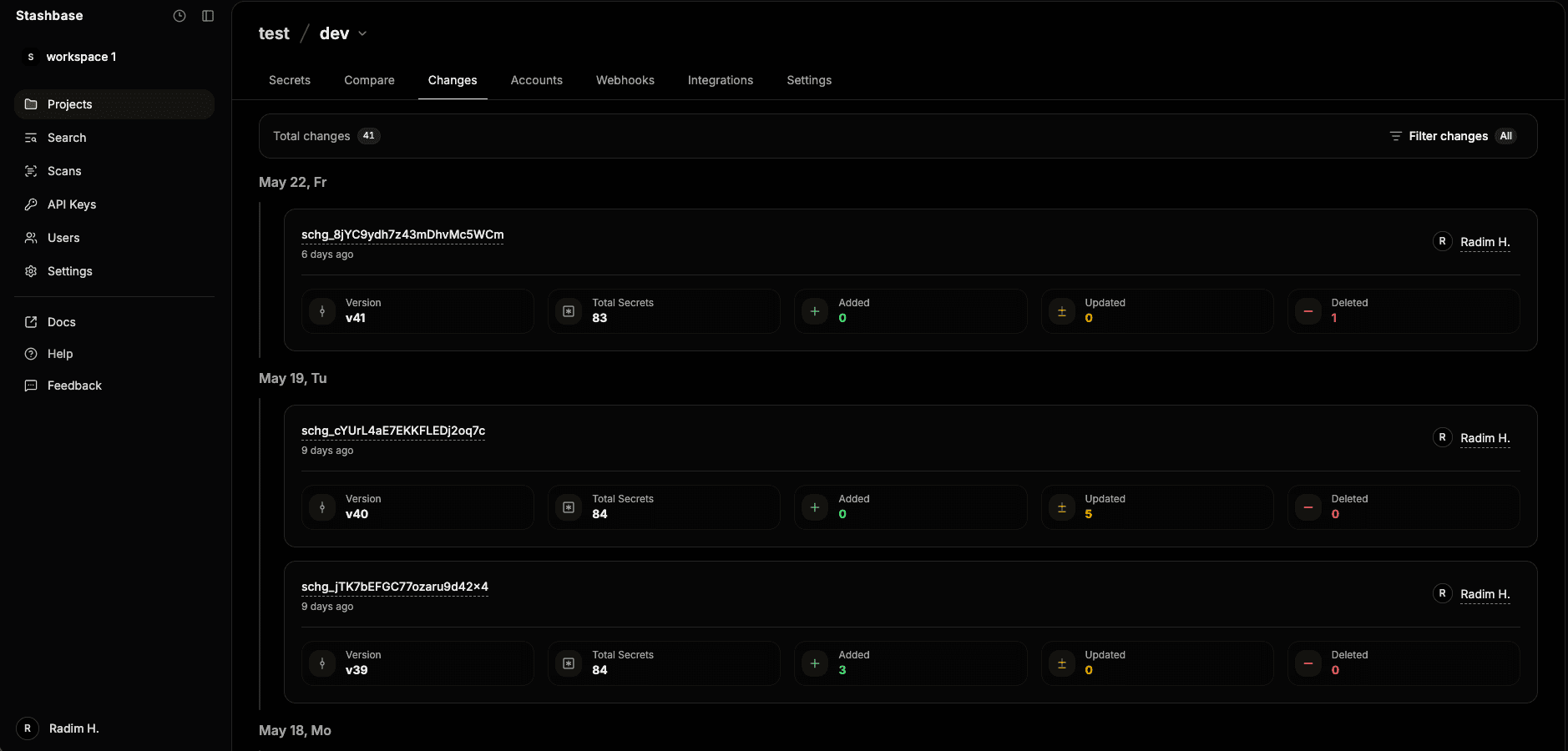
Secret Changes
Secret Changes is used to track changes to secrets. Every changes made to the environment secrets will be tracked and saved. You can inspect those changes in the web dashboard or rollback to any previous state.
Accounts
There are two main APIs:
Environment APIWorkspace API
When using Environment API, you get access only to selected environment and its resources (based on selected permisssion). You can use Environment API only with Environment Accounts and its API Key.
You can create Environment Account from web dashboard going to individual environment page and clicking on Accounts tab.
Each environment account have exactly one API Key that is generated automatically.
Each account can have additional permisions other than environment.read which is default for each account.
Those accounts can be created with expiration date or can be created without expiration.
This Environment Account and its API Key is particularly useful for running your apps in production because with our official SDKs you can run load your environment and inject the secrets as environment variabled wih just 2 lines of code.
Webhooks
With webhooks you can send HTTP request to your server whenever secrets in selected environment are modified. Each webhook has its own unique id and is associated with an environment. You can easily create and manage environment webhooks in the web dashboard or with our CLI.
Integrations
Integrations are used to connect your environment with other services. Stashbase supports external integrations to sync and automate secret workflows.
Learn more about AWS Secrets Manager integration and GCP Secret Manager integration
Deleting an environment
When deleting an environment in Stashbase, the behavior depends on whether it contains any stored resources.
Soft deletion
Environments are soft-deleted (and can be restored) if they contain any of the following (see structure section above):
Secret ChangesAccountsWebhooksIntegrations
This ensures no critical data is lost accidentally and provides a safety net for recovery. Those environments can be restored within 30 days via dashboard.
Hard (permanent) deletion
Environments are permanently deleted (hard delete) if:
- They contain no resources — meaning no secret changes, webhooks, integrations, or environment accounts. This happens automatically to keep your project clean and avoid clutter from unused environments.